Performant npm: the package manager that rethinks node_modules
- September 2026 |
- 05 Mins read
The choice of a package manager is one of the few technical decisions that almost no team ever makes consciously. It is inherited from the template used to initialise the project, from the tutorial followed on day one or simply from the fact that npm ships alongside Node and nobody has a reason to look further. Then the project grows, dependencies multiply, the node_modules folder becomes the heaviest structure on disk and every clean install in continuous integration burns minutes that everyone has learned to consider unavoidable. pnpm was born out of exactly this dissatisfaction, and its premise is that most of that cost is not intrinsic to the JavaScript ecosystem but depends on how packages are materialised on the filesystem.
The name stands for performant npm, and the description usually attached to it, a fast package manager that is efficient with disk space, only tells the less interesting half of the story. Speed is a consequence rather than a goal pursued through micro optimisations. Behind it sit two design decisions that support each other, a global store shared by every project on the machine and a node_modules structure that refuses to flatten the dependency tree. The first decides how much space and time an install costs, the second decides what the code is allowed to import, and it is the one that genuinely changes the way people work.
The global store and hard links
With npm every project receives its own physical copy of every package, so ten projects using the same version of a library pay ten times for the same content. pnpm instead keeps a single content addressable store, where each file is saved once and identified by its own hash. When a project declares a dependency, pnpm copies nothing and creates hard links to the files already present in the store, so the same block on disk is referenced by every installation that needs it and takes up space only once.
The fact that addressing happens at file level rather than package level has a notable side effect, because upgrading a library to the next version means downloading only the files that actually changed while everything else is linked to what was already there. Installing becomes largely a matter of linking on the filesystem instead of copying and unpacking, and that is where the difference in timing compared to other managers comes from. The only constraint worth knowing is that hard links work within the same volume, so if the store lives on a different disk from the project pnpm falls back to copying and the advantage shrinks.
The non flat node_modules structure
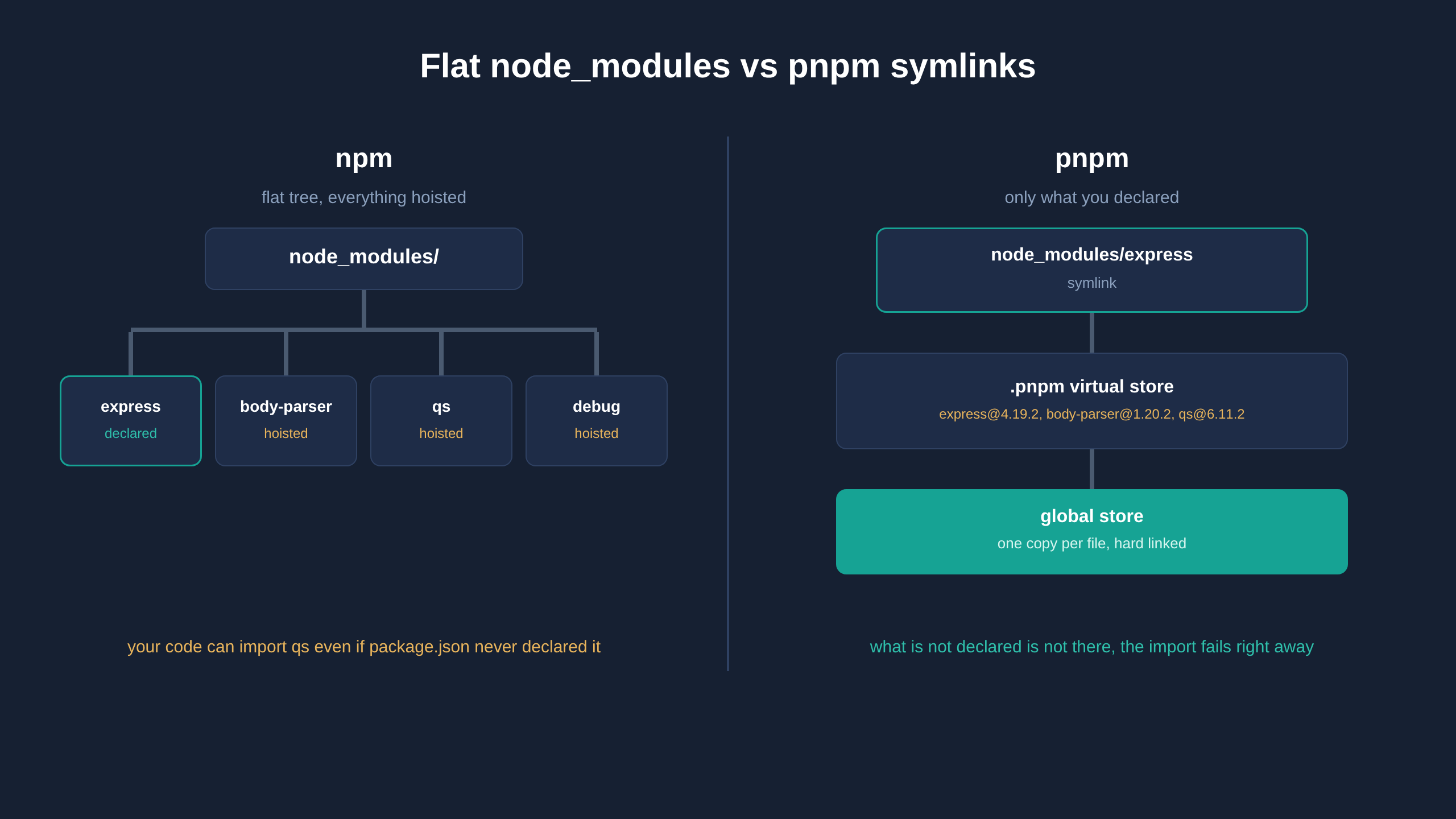
The second decision is the one that generates the most debate. npm and Yarn in its classic version flatten the dependency tree, hoisting transitive packages to the first level of node_modules to avoid duplication. The consequence is that any library installed by somebody else in the chain becomes importable from application code even if it never appears in package.json. These are the so called phantom dependencies, and the problem is not theoretical, because the day an intermediate dependency changes version or stops using that library the project stops building without anyone having touched their own code.
# In a pnpm project, only declared dependencies are visible at the top level
node_modules/
  express -> .pnpm/express@4.19.2/node_modules/express
  .pnpm/
    express@4.19.2/node_modules/express
    body-parser@1.20.2/node_modules/body-parser
pnpm makes that shortcut impossible. Only explicitly declared packages appear at the first level of node_modules, in the form of symbolic links pointing to an internal virtual store where the real tree with all resolved versions lives. Importing something that was never declared produces an immediate error during development, rather than a deferred failure in production.
Everyday commands and migration
The interface is deliberately familiar, to the point that the learning curve is exhausted within a morning. The pnpm install command rebuilds dependencies from the lockfile, pnpm add adds a package, pnpm remove deletes it and pnpm run executes a script defined in package.json. It is also worth knowing pnpm dlx, which runs a package without installing it the way npx would, and pnpm why, which explains which dependency is pulling in a given library.
Migrating an existing project is less invasive than people fear. The pnpm import command reads the package-lock.json already in place and derives an equivalent pnpm-lock.yaml from it, preserving the exact versions that were already resolved, after which the old lockfile and the node_modules folder are removed and everything is installed from scratch. It is then a good idea to pin the manager version in the packageManager field of package.json and enable corepack, so that every developer and the build pipeline use exactly the same binary.
# Enable the version pinned in the packageManager field
corepack enable

# Derive a pnpm lockfile from an existing package-lock.json
pnpm import

# Add a dependency to a single package of the workspace
pnpm add zod --filter @app/api
Workspaces and monorepos
Monorepo support is native and requires no additional tooling. A pnpm-workspace.yaml file at the root lists the paths of the packages that make up the repository, and from that moment each one keeps its own package.json and its own node_modules without dependencies being hoisted. The same property described earlier follows on a larger scale, since a package cannot accidentally use a library declared by the one next to it. The workspace protocol makes it possible to reference an internal package without going through the public registry, and at publish time the reference is replaced with the real version number. The filter option finally allows a script to run on a subset of the repository, optionally including the packages that depend on the selected one.
Where pnpm creates friction
It would be dishonest to present it as a replacement without costs. Part of the ecosystem takes the flat node_modules structure for granted, and legacy tools, some bundlers and certain React Native setups may not resolve modules the way they expect. pnpm offers gradual escape hatches, from the ability to publicly hoist only the packages matched by a pattern to a linker that recreates the whole flattened structure while still keeping the shared store. These are acceptable compromises when they are needed, provided they remain the exception rather than the default configuration.
For a healthy project the migration cost is measured in hours, while the benefit is structural. Disk space is reclaimed, install times in continuous integration get shorter and, above all, the resulting dependency graph matches the declared one. A package manager is not a matter of taste but the layer that decides what the code is allowed to import, and it deserves the same attention given to any other architectural choice.
To learn more: https://pnpm.io/