From Master/Slave jumpers to NVMe: how computers learned to configure themselves
- RetroTech
- |
- October 2026 |
- 5 min read
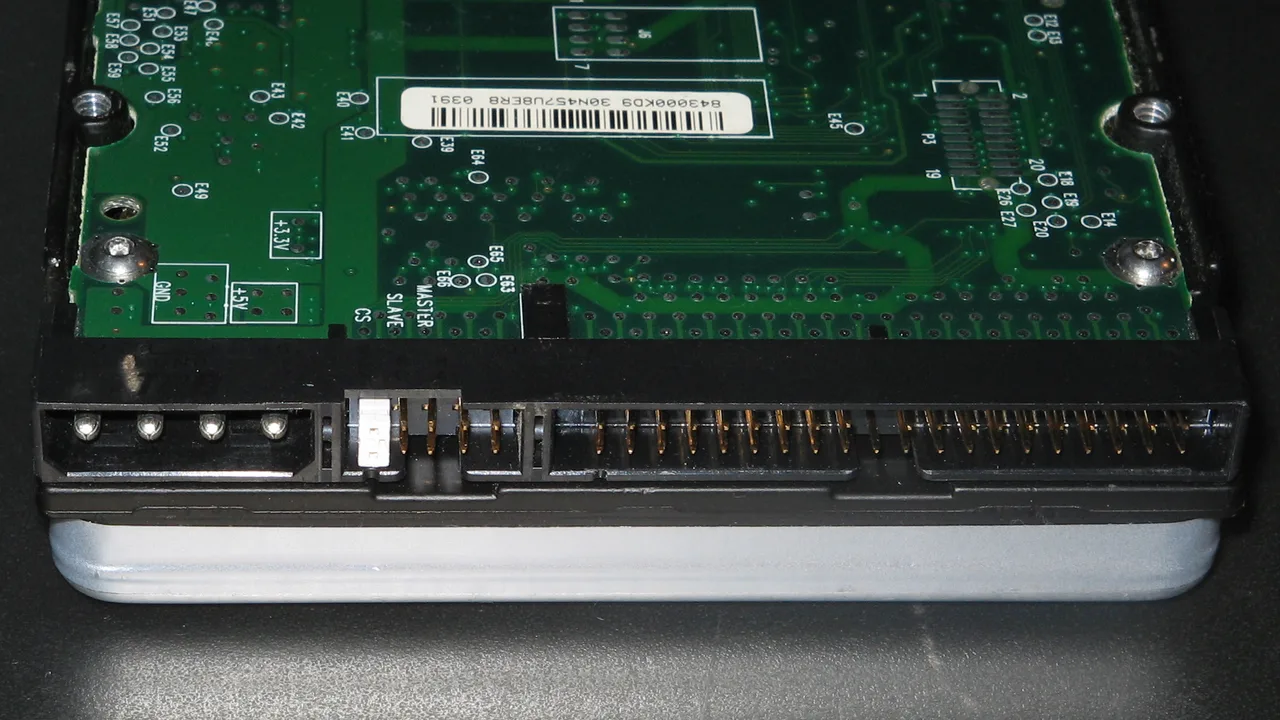
All it took was a pair of tweezers, or a long enough fingernail, to move that tiny plastic jumper on the back of the hard drive, and all it took was one pin too far to spend the afternoon wondering why the computer could not see the new disk. Some time ago I shared this memory in a post, expecting it to amuse a handful of colleagues from my generation, and it became the most read thing I have ever written, with more than 2,800 reactions and over 600 comments from people telling their own version of the same story. It was not just nostalgia, because that gesture was the moment you understood, with your own hands, that a computer had to be configured and that configuration was the responsibility of whoever built it. RetroTech, the HeroHubs series on the technologies that shaped computing, grew out of that moment.
Two drives, one cable and a jumper
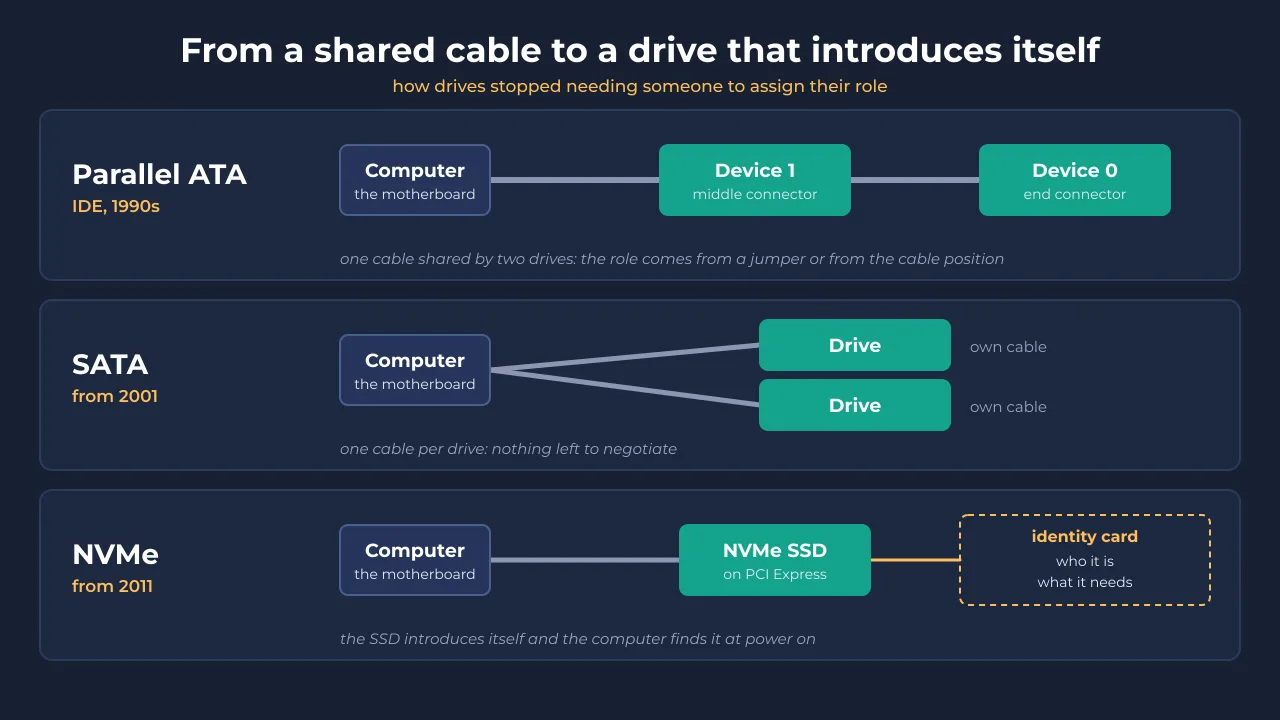
In the nineties drives were connected to the motherboard through a wide flat cable, following the standard almost everyone called IDE, and the same cable could carry two devices, say a hard drive and a CD player. Someone had to decide who spoke first, and that choice was left to the jumper on the back of each drive, set to Master, Slave or Cable Select, which let the position on the cable decide. If both claimed to be Master, or both claimed to be Slave, one of them vanished or the computer froze at power on, and that was not the end of it, because you also had to type into the BIOS, the program that starts before the operating system, the numbers printed on the label that described how the drive was built. The more recent ATA specifications themselves refer to device 0 and device 1, and over time the industry also dropped the Master and Slave pair in favour of neutral terms.
A jumper for every card
The hard drive was just the most visible case of a problem that touched the whole machine. Every card you added, from the sound card to the modem, needed a few reserved resources to get the processor’s attention, starting with an interrupt line, a kind of doorbell for asking to be heard, and those too were set with jumpers and tiny switches. The computer had no idea which doorbells were already taken, so two cards on the same one were enough to cause freezes or devices that vanished without explanation, and the map of free resources lived in the head of whoever had built the machine, or on a sheet of paper tucked inside the case, which for many technicians was the first piece of infrastructure documentation they ever wrote.
When hardware started introducing itself
The turning point came when the question was flipped, and instead of asking a person to explain the hardware to the computer, the hardware was asked to introduce itself. In 1993 Intel and Microsoft published the Plug and Play specification, which Windows 95 brought to every desk with early reliability shaky enough to earn it the nickname Plug and Pray. On the PCI internal bus, then, every card began to expose a kind of identity card listing its manufacturer, its model and the resources it needs, which the computer reads at power on to hand out resources without conflicts. Drives followed the same path: with SATA, whose first specification dates from 2001, every drive has its own cable and the question of who comes first disappeared along with the jumper, and with the NVMe standard, published in 2011, SSDs connect straight to PCI Express and introduce themselves like any other card. Today a new drive goes in and the computer finds it on its own, without anyone needing to know which pin a jumper was supposed to sit on.
Configuration did not disappear, it moved
It would be easy to read this story as the end of configuration, but it is more accurate to say that configuration moved, from hardware to software and from a manual task to a description of the result you want. In modern systems made of many services, each one announces itself and the others find it without addresses typed in by hand, just as PCI cards introduce themselves to the computer, and this is what is called service discovery. Many frameworks follow convention over configuration, with defaults that hold as long as the conventions are respected, a bit like a Cable Select for software, and in cloud infrastructure nobody writes the steps to prepare a server any more, they describe the end state, while tools such as Kubernetes keep comparing that description with reality and step in on their own when the two drift apart.
Every layer that configures itself hides an implicit contract, though, and someone still has to understand it when things break. Cable Select only worked with the right cable, Plug and Play struggled when an old card held a resource the system could not see, and in the same way a default stops being a convenience once a project drifts away from the convention, while a system that faithfully realigns reality with the wrong description will ship the mistake to production with the same diligence it would bring to the fix. For anyone leading a technical team the lesson is a practical one: automation does not remove complexity, it moves it to a place people look at less often, and that place is where documented rules, tools to see what is really happening and at least one person able to step down a level when the automatism jams are needed. The jumper on the wrong pin at least had the merit of being visible to anyone who opened the case, and the question worth asking today is exactly that: which automatism in your infrastructure could nobody on your team configure by hand any more, if it stopped working tomorrow?