The .claude folder: the control centre of Claude Code
-
- AI |
- July 2026 |
- 05 Mins read
Most developers using Claude Code live alongside the .claude folder without ever really opening it. They see it appear in the repository root, they know it exists, but they treat it as an opaque artefact generated by the tool. It is a missed opportunity, because that folder is not an implementation detail but the control centre from which the behaviour of Claude in every working session ultimately depends. Understanding what it contains, which files are edited often and which are set once and forgotten, is the difference between putting up with the assistant’s answers and configuring it to behave the way the team wants.
Two folders, not one
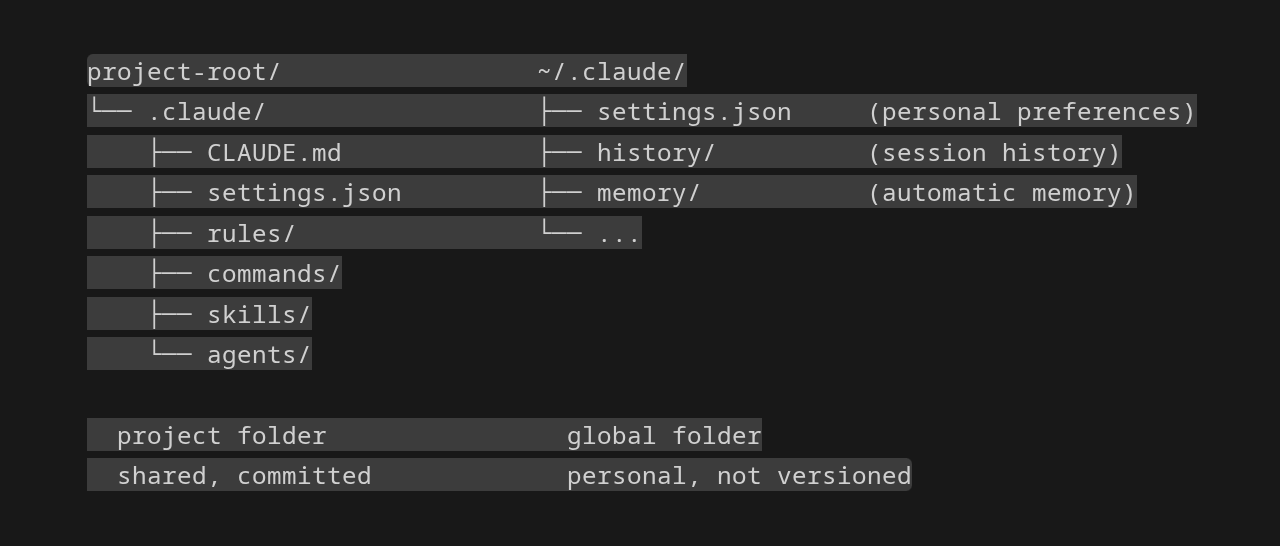
The first thing to clarify is that there are two .claude folders, not one. The project folder lives in the repository root and is meant to be versioned together with the code, because it holds shared configuration: every team member inherits the same rules, the same custom commands, the same permission policies. The global one lives in ~/.claude/ and is personal, holding individual preferences, session history, and the automatic memory Claude builds over time. Confusing the two levels leads to configurations that work on the machine of whoever wrote them and break the moment someone else opens the project, or conversely to personal rules accidentally ending up in the shared repository.
The CLAUDE.md file
CLAUDE.md is the single most important file in the entire system. When Claude Code opens a session it loads CLAUDE.md directly into the system prompt and honours it for the duration of the conversation. Whatever is written there is respected consistently, from naming conventions to architectural choices, from build and test commands to logging habits. The value of the file depends heavily on the discipline with which it is maintained. What works are real commands to run, non-obvious architectural decisions, project-specific traps such as compiler strict mode or non-standard import conventions. What does not work are copies of documentation that could be linked elsewhere, theoretical explanations, and endless lists of stylistic preferences that a linter would cover more reliably.
There is a practical threshold beyond which CLAUDE.md stops being effective. Past two hundred lines the model starts losing adherence to instructions and the file becomes one of those internal wikis nobody actually reads. When the project grows it pays to rely on the rules/ folder, which allows instructions to be split into separate files loaded automatically alongside CLAUDE.md. Each rule can be further scoped to specific paths through a YAML frontmatter block, so that API conventions are not loaded when Claude is working on a React component and vice versa. It is the same principle behind the modular configuration of tools like ESLint or Prettier, applied to natural language instructions.
Custom commands
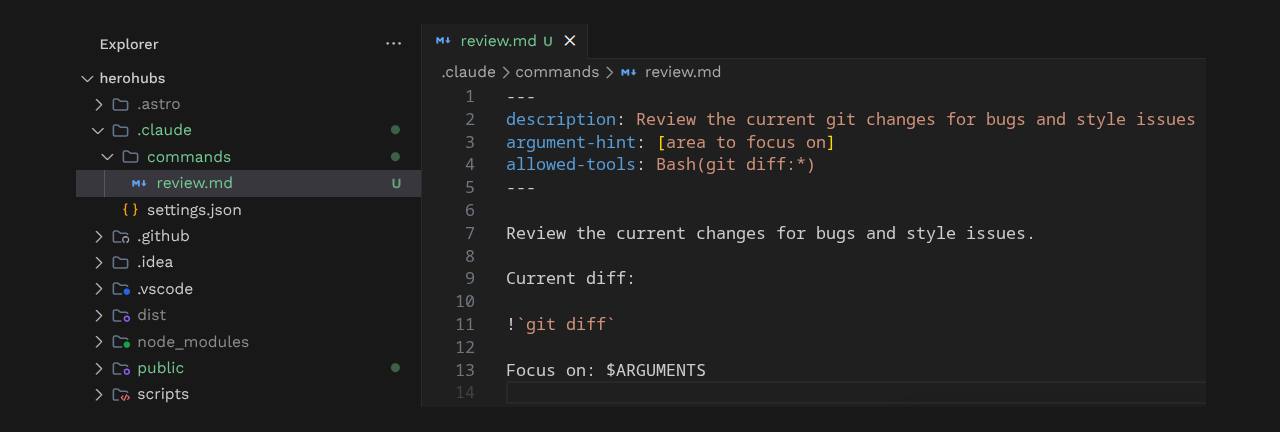
The commands/ folder turns markdown files into slash commands callable from the conversation. A file named review.md becomes the command /review, invoked by name alone in recent versions and no longer through the old /project: prefix. The value of these commands does not lie in saving a reusable prompt, as a snippet would, but in the ability to inject into the context the output of shell commands executed on the fly or arguments passed by the user. A fix issue command, for example, can take the issue number as an argument and pull in its content. The example in the image is a command of this kind: the frontmatter declares the required permissions, the line that runs git diff injects its output into the prompt and $ARGUMENTS captures the area to focus the review on, so invoking /review is enough to bring the current diff in front of Claude. It is worth adding that in recent versions custom commands and skills have converged into the same mechanism, so that a file in commands/ and an equivalent skill produce the same command.
Skills and agents, two different forms of automation
Skills and agents are often confused because they both live in dedicated folders inside .claude, but they answer opposite needs. A skill is a workflow that Claude activates on its own initiative when the conversation matches the description in the frontmatter of the SKILL.md file, without the user having to invoke it explicitly. When Claude is asked to review a pull request for security issues, a skill called security-review can be recognised and loaded automatically. Skills have the advantage of being able to carry supporting files with them, detailed guides, and reference documentation that live next to SKILL.md and are pulled into the context only at activation time.
Agents, by contrast, are specialised personas with their own system prompt, their own tool selection, and even their own model preference. When a task is complex enough to deserve an isolated context, Claude can delegate it to an agent that works in its own space, returns a compressed result, and keeps the main session clean. The ability to restrict the tools available to an agent is an important design choice: a security auditor has no business being able to write files, and limiting its permissions to Read, Grep, and Glob is a form of least privilege applied to automation.
Permissions and settings.json
The settings.json file defines what Claude can do without asking for confirmation, what is blocked outright, and what falls into the intermediate zone that requires approval. The structure includes an allow list for safe, repetitive commands such as npm scripts or read-only git operations, a deny list for dangerous actions such as rm -rf, access to sensitive files, or direct network calls, and a default behaviour that always prompts for confirmation on anything not covered by the two lists. This third zone is what makes the system usable in practice, because it does not force the team to anticipate every possible command in advance while still providing a reasonable safety net. As with CLAUDE.md, there is a local equivalent, settings.local.json, automatically excluded from version control, where personal overrides can be placed without polluting the team configuration.
A realistic progression
Adopting all of this structure from day one is overkill for most projects. A progression that works starts from an essential CLAUDE.md produced with /init and trimmed manually to the entries that actually matter, continues with a settings.json that explicitly declares the baseline permissions, adds one or two custom commands for the most repetitive flows such as code review or fixing an issue, and only when CLAUDE.md starts to swell promotes its sections into separate files inside rules/. Skills and agents come later, when complex workflows emerge that deserve to be packaged. The .claude folder is ultimately a protocol for telling Claude who you are, what the project does, and which rules you want respected. The more clearly that is defined, the less time is spent correcting its answers and the more time it actually spends producing useful work.